
Resources and Customer Stories



IRISNext
Doc Center V11.0
All documentation for installing and managing your IRISNext environment, for both developers and end-users.

Case Studies
A selection of documented customer success stories. Contact us for specific use cases and sector expertise.




Webinars and Video
This webinar shows how the Administrative Immigration Office of Belgian cities are processing residency applications, passport verifications and related citizen services. Where these departments receive lots of requests, it tends to be an administrative-heavy and paper intense process.
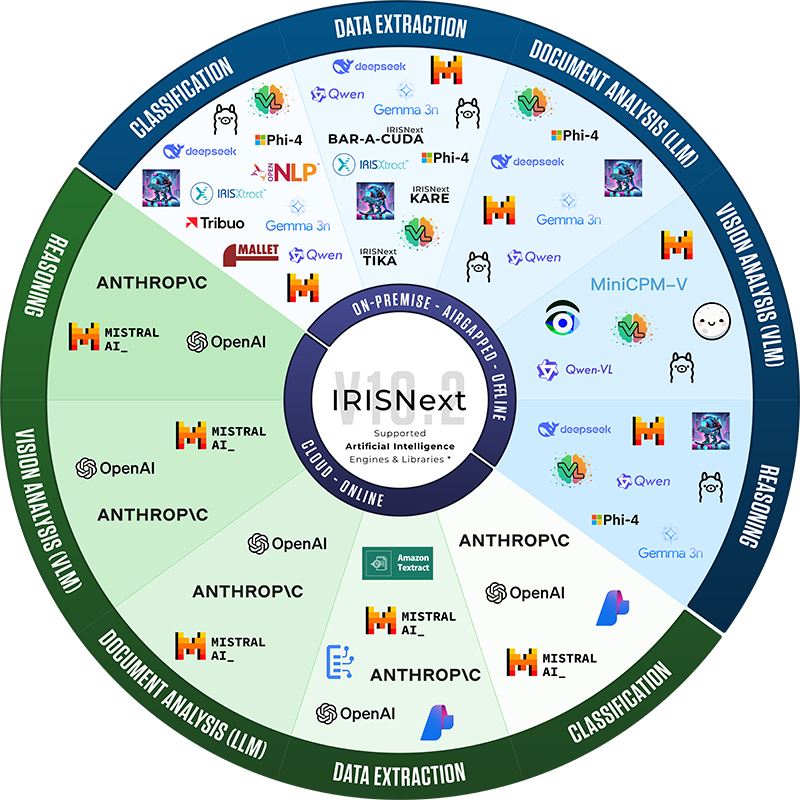
Supported AI engines & libraries infographic
Click on the image to download a high-resolution visualization of all AI services and LLM supported in IRISNext 10.2.
What’s new in IRISNext
A quick overview of the main changes and improvements introduced in each version of IRISNext, starting from version 10.0.
Version 11.0 marks the first release of the 11.x generation and is designated as a Short-Term Service (STS) release.
It introduces a modernized technology foundation while delivering the same functional experience for both Cloud and On-Premise deployments. This release is recommended for organizations adopting cloud-native infrastructure, Kubernetes environments, or the latest enterprise technology stack. For customers prioritizing long-term stability, IRISNext 10.2 remains the current Long-Term Service (LTS) release, supported until January 2031.
Cloud & Platform
- Unified Cloud and On-Premise experience. No functional differences between Cloud and On-Premise deployments.
- Spring Boot architecture. The main service has been redesigned using
- Spring Boot for improved performance and maintainability.
- Enhanced monitoring & observability. Improved diagnostics and operational visibility simplify platform management.
- Cloud-friendly deployment model. Simplified deployment process designed for modern cloud infrastructures.
- New BatchPusher service. Optimized document import service for cloud-based deployment scenarios.
- Kubernetes-ready architecture. Supports scalable, resilient deployments in Kubernetes environments.
- Technology Stack Modernization
IRISNext 11.0 aligns the platform with the latest enterprise technologies, ensuring improved compatibility, security, maintainability, and long-term platform evolution.
The platform now includes:
Java 25
Spring Boot 4.1
Spring Framework 7
Tomcat 11
Lucene 10
Jackson 3
Groovy 5
Gradle 9
.NET 10
Debian 13
iDRS 16
E-Signatures
- New IrisSign plugin. Provides a workflow node to sign documents using PKCS#11 or MSCAPI. It can also extract and validate signatures from PDF documents, and perform bulk sealing with a D-Trust Multi-Seal smartcard.
- Customisable signature image. Users can now design their own signature image (using different fonts or hand-drawing) for use with IrisSign.
- New Scrive plugin. Workflow node for signing documents via the Scrive platform.
- New DocuSign plugin. Workflow node for signing documents via DocuSign.
- For all three plugins (IrisSign, Scrive, DocuSign), the person preparing the signature request can now be included as a signatory.
- The old DSSESIG plugin has been replaced by IrisSign. Signature options on object types and storage of user/object certificates have been removed.
IDP & AI Services
- New AI engines: Anthropic and MistralAI have been added alongside existing engines.
- Multiple models per database. Both Ollama and OpenAI engines can now use multiple models inside a single database.
- Azure improvements. The Azure engine now supports custom models, updated pre-built models, and ships with all pre-built models as ready-to-use index cards and object types.
- Flexible document handling for AI. All LLM engines now support sending documents to the AI in different formats (plain text, embedded text, PDF, or images at low/high resolution).
- IRISNext KARE — a new fully local extraction engine (no external subscription needed) for Keywords And Regular Expressions. It can extract numbers, dates, URLs, emails, IBANs and more, with advanced filtering and scoring based on page number, position, proximity to keywords, and custom rules.
- IRISNext Barracuda — a new fully local engine for recognising and extracting values from barcodes within documents.
- AI Actions. Administrators can configure “AI actions” that let users ask questions about a document directly from its PDF preview.
Import Jobs
- AI-infused import jobs. Two new processing modes:
- Pre-processing mode: extracts information automatically before importing the batch.
- Interactive mode: extracts information and then sends the batch to the IDP user assistant for confirmation.
- JSON support as a data source in VFS/LFS import jobs (in addition to CSV and XML).
Rendition Server
- Very large images supported — up to 32,767 × 32,767 pixels (the equivalent of a full A0 page scanned at 600 DPI).
- For each file extension, you can now choose whether to replace the original or add a PDF rendition alongside it.
Workflows
- New SVG-based graph editor for designing workflows.
- New “Transform” node — converts an object to a different object type or moves it; can use IDP to find the parent object.
- New “Pause” node — pauses a workflow until a specific moment. The wait can be defined as a fixed duration, a cron expression, a specific date/time, a calculated duration, or a workflow field.
- The “Launch Workflow” action can now pre-fill the workflow form with values.
- Improved “Wait for next task in same execution” option — it now also considers parent and child executions.
- New “Upload a version” UI node.
- New action to delete all binaries (versions and renditions) of an object without deleting the object itself.
- New actions to attach an object to a workflow execution or detach it.
- The legacy IDR workflow node (used for IRISXtract integration) now runs through the Hades service.
Microsoft 365 Integration
- The PowerPoint add-in can now store the IRISNext document link in PowerPoint’s custom properties (requires a recent PowerPoint version).
User Interface & Experience
- Cleaner left navigation bar with an improved look and feel.
- Timeline-based retention view showing past and future retention applied to an object.
- Profile picture support. Users can now set their own profile picture, either via webcam or by uploading an image.
- Built-in localisation. Each database can be configured with a default language, regional format for dates/times/numbers, time zone, and paper format. Users can override any of these in their preferences.
- Notification Bell icon added to object dialogs (where notifications are supported), with a simplified configuration dialog.
- Improved password fields.
- New ScanOnWeb client — for customers with an IDP licence, batches and documents can now be separated using IRISNext QR codes, custom barcodes, or blank pages; QR codes can contain metadata, and documents can also be reconciled directly by QR code. A new WIA scanning engine is available as a preview.
Other New Capabilities
- Object Type: the fields displayed on the “linked objects” tab and in pop-ups can now be configured.
- Index Model: new IBAN field type.
- Zip Export from the UI: export several objects at once as a single ZIP file.
- Storage: new storage engine for Google Cloud Storage (both with and without IRISNext-managed retention).
- Monitoring: a new monitoring page in dbadm shows the status of all services running in the cluster (web, business logic, rendition, IDP).
- Reconciliation barcodes can now be generated as QR codes (the older PDF417 format is still available).
Scripting
- Two new hooks (beforeBarcodeReconciliate and afterBarcodeReconciliate) for advanced barcode handling.
- The “launch workflow” API now supports pre-filling the workflow form.
Intelligent Document Processing (IDP)
- IDP user assistant. A new assistant that automatically pre-fills index fields when users upload or scan documents, saving time and reducing manual entry errors.
- Interactive import jobs. Import jobs can now connect to data sources such as mailboxes or import folders, use AI services to enrich and classify documents, and then pass them on to the user assistant for review.
- Scalable IDP service. The IDP service can be installed on the same server as the rendition or business logic services — or on dedicated machines when document volumes are high.
- Multiple AI engines supported. The IDP service can:
- Classify documents fully on-premise using algorithms like Tribuo, OpenNLP, and Mallet (training is done directly through the IRISNext interface).
- Extract data via cloud services (Azure Document Intelligence, AWS Textract, Google Document AI, OpenAI) or fully offline using Ollama.
- Extract metadata from original files (author, title, GPS coordinates, etc.) — fully on-premise.
- Analyse photos using vision models, either through OpenAI (cloud) or Ollama (on-premise).
Microsoft 365 Integration
- The IDP assistant is now available inside Outlook 365 — both the desktop and web versions.
- Improved support for Microsoft Exchange on-premise.
Scanning (ScanOnWeb)
- Documents can now be separated automatically using blank pages or QR codes from the desktop scanning client.
- QR code separators can be generated directly from the web interface.
Uploading Files
- Optional duplicate detection when users upload a file via the web interface.
- Optional virus detection on uploaded files (requires a compatible antivirus solution).
Word Templates
- Templates now support inserting images and QR codes.
- QR code content can be generated dynamically using template expressions.
Scheduled Jobs
- Recycle Bin Cleaner: automatically empties the recycle bin after a configurable period.
- Job Run Cleaner: automatically deletes logs from scheduled and import jobs after a configurable number of days.
Index Model
- Ability to define forbidden values for index fields — enabling a “blacklist” approach in addition to the existing “whitelist” approach.
- New $uuid()$ expression for default field values (alongside the existing $today()$, $year()$, $userid()$, etc.).
Viewer & Annotation
- HEIC image preview is now supported.
- Annotation viewer buttons collapse into dropdown menus when vertical space is limited.
- New option to send annotated PDFs by email.
Workflows
- Workflow tasks now display their history directly inside the object’s workflow panel, with improved task behaviour.
File Rendition
- MSG (Outlook) files now convert HTML-in-RTF content into standard HTML, preserving embedded images.
- OCR engine upgraded to iDRS 16.2.2 on Windows.
Other Improvements
- Single license file that covers the IRISNext server, the Rendition Server, and the IDP server.
- Ability to add extensions when building the application using the createwar command.
- Direct upload of folder or ZIP file contents into standard import jobs.
Version 10.0 is mostly a technical foundation release. Behind the scenes, the platform was modernised to provide a stable base for all upcoming 10.x updates, which then focus on new functionality.
Platform & Performance
- Modernised technology stack. IRISNext now runs on Java 17 (previously Java 8), bringing better performance, stronger security, and long-term support. Future Java versions (21, 25, etc.) will continue to be supported.
- Lighter, leaner installations. A new modular setup means only the components you actually need are loaded at startup, reducing resource usage while keeping the server secure.
- Better support for cloud environments. Server-to-server communication has been redesigned to work efficiently on Kubernetes, Microsoft Azure, and Amazon Web Services. Both the IRISNext Server and the Rendition Server can now run in scalable containers with automatic scaling.
- Now also on Linux. The Rendition Server (which handles document conversion and OCR) has been ported to Linux.
- Faster web performance. Pages now load using modern HTTP/2 with Brotli compression, reducing bandwidth use and page load times.
Supported Environments
- Operating systems: Windows Server 2019+ / Windows 10+, Debian 12+, Ubuntu 22.04+, CentOS 9+.
- Databases: PostgreSQL 14+, Microsoft SQL Server 2019+, Oracle 19c+, IBM DB2 11.5+.
Customisation & Scripting
- New, safer scripting engine. The old BeanShell engine has been replaced with SpEL (Spring Expression Language), which is more powerful, more secure, and supports modern programming features. It is largely compatible with previous scripts and offers a wide set of built-in helpers for handling text, dates, and files.
New Features
- Multiple dashboards. Administrators can now define several dashboards and grant read or write access to specific users or groups.
- Multiple index models per object type. You can now link an object type to several index models — for example, a generic model reused across many object types combined with one or more specialised models. This also enables cross-document searches.
- Stronger legal archiving with double hashing. Up to two security hashes can now be calculated for every stored document, providing a stronger guarantee that files have not been altered. If a hash algorithm is ever compromised, you can swap it out and IRISNext will recalculate everything automatically.
- AI cloud services integration. IRISNext can now connect to AI services such as OpenAI ChatGPT, TextRazor, and IBM Watson to analyse, classify, or enrich your documents.
- PDF preview on Android. IRISNext now detects when an Android device cannot natively display PDF files and falls back to its own viewer.
- Smarter OCR. New options to skip PDFs that already contain text or that have e-signatures, plus support for the next-generation iDRS 16 OCR engine (with neural-network-based recognition for hard-to-read or non-Latin documents).
- Scan directly into an Import Job. The desktop scanning client can now scan straight into a standard import job.
- LDAP language synchronisation. User language preferences can now be synchronised from your LDAP directory.